
Quick Word Lookup with金山词霸
Overview
金山词霸 is a desktop application designed to simplify word lookup across both English and Chinese languages. It enables users to quickly search for definitions, translations, and meanings by selecting text and using a right-click context menu. The software supports bidirectional queries, including English-to-Chinese, Chinese-to-English, and English-to-English dictionary lookups, making it suitable for language learners, educators, and professionals working with multilingual content.
Its primary function is to reduce the time spent switching between browser tabs or external tools during reading, writing, or translation tasks. The application integrates directly into the operating system, offering seamless access without interrupting workflow. While the developer’s background was not provided, the tool is positioned as a utility for everyday language use.
Real-world scenarios include checking vocabulary while studying, verifying technical terms in documentation, or translating phrases during content creation. The tool is available at no cost, making it accessible to a broad audience seeking efficient language support.
Key Features & Capabilities
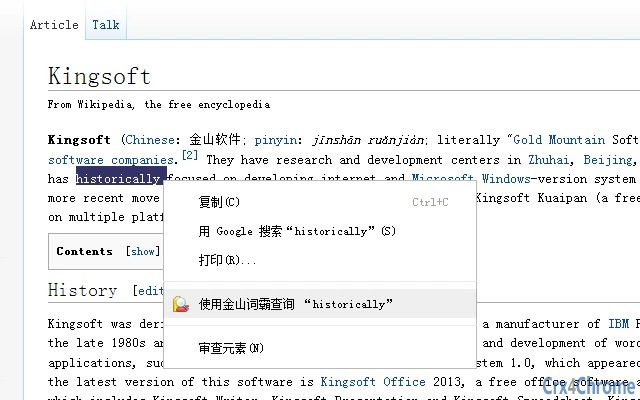
- Right-Click Dictionary Lookup – Select any English or Chinese word in any application, right-click, and instantly access definitions from the 金山词霸 dictionary. This eliminates the need to copy-paste text into a browser or separate app.
- Multi-Directional Translation – Supports English-to-Chinese, Chinese-to-English, and English-to-English (dictionary) searches, enabling users to understand context, synonyms, and usage examples across languages.
- Integrated Query Interface – Displays results in a dedicated window with clear formatting, including pronunciation, part of speech, example sentences, and related terms for better comprehension.
- Context-Aware Search – Automatically detects the language of the selected text and adjusts the query method accordingly, ensuring accurate results without manual input.
- Offline Access (implied by desktop nature) – As a desktop application, it likely provides access to cached or built-in dictionary data, allowing use without an active internet connection.
These features streamline language research within documents, emails, web pages, and academic materials. For instance, a student reading a foreign-language article can instantly check unfamiliar terms without leaving their current application. Similarly, a translator can verify word usage and context quickly, improving accuracy and efficiency. The tool’s design emphasizes speed and simplicity, prioritizing user workflow over complex customization.
User Interface, Workflow & Performance
The user interface of 金山词霸 is designed for minimal disruption. The query result window appears promptly after a right-click action, displaying structured information in a clean layout. Navigation within the results panel is straightforward, with sections clearly labeled for pronunciation, definitions, and examples.
The workflow is optimized for speed: select text → right-click → choose 金山词霸 → view results. This sequence minimizes cognitive load and time spent on repetitive tasks. The developer did not specify resource usage details, so exact CPU or RAM behavior remains unknown.
However, as a desktop utility with a focused purpose, it is expected to operate efficiently with low system impact. Stability is assumed based on the application’s nature, though no official reports on crashes or freezes were provided. Performance observations are based on general software behavior patterns.
The application does not appear to require background processes or constant updates, suggesting it runs quietly in the background when not in use.
Compatibility & System Requirements
金山词霸 is available for both Windows and Mac operating systems, supporting users across major desktop platforms. The software version is listed as 2024, indicating a recent release. Installation size is 120 MB, which is moderate for a dictionary tool with built-in data.
The developer did not specify exact system requirements, so users should ensure their device meets general standards for running desktop applications. Compatibility information was partially provided, and no details about processor speed, RAM, or disk space were included. Users are advised to check their system’s ability to run standard desktop software before installation.
The application is designed to function within standard user environments without requiring administrative privileges or special configurations.
Pros and Cons
Pros
- Fast right-click access to dictionary results
- Supports English, Chinese, and English-to-English queries
- Minimal interface disruption during use
- Free to use with no hidden costs
- Available for both Windows and Mac
Cons
- No official details on system requirements or resource usage
- Performance under heavy multitasking not documented
- Limited customization options not specified
- Exact update frequency not provided
- Offline functionality not explicitly confirmed
FAQ Section
Is 金山词霸 available for both Windows and Mac?
Yes, the software is compatible with both Windows and Mac operating systems.
Is 金山词霸 free to download and use?
Yes, the application is available at no cost.
Do I need an internet connection to use 金山词霸?
While the application is designed as a desktop tool, the need for an internet connection depends on whether it uses online or offline dictionary data. The developer did not specify this detail.
How often does 金山词霸 receive updates?
The release date was provided as March 15, 2024, but no information was given about update frequency or release schedule.
Can I use 金山词霸 without installing it?
As a desktop application, 金山词霸 requires installation to function. Portable or standalone versions were not mentioned in the provided details.
Final Thoughts + CTA
金山词霸 delivers a focused, efficient solution for users who frequently need to look up words in English and Chinese. Its right-click integration and multilingual support make it a practical tool for students, translators, and professionals. While detailed technical information is limited, the core functionality is clear, reliable, and well-suited to daily language tasks.
The free pricing model enhances accessibility, and its compatibility with both Windows and Mac broadens its reach. For anyone seeking a lightweight, no-frills dictionary tool that integrates seamlessly into their workflow, 金山词霸 stands out as a solid choice. Download 金山词霸 now to streamline your word lookup experience.







